
Why Are More Businesses Choosing Divisible Meeting Rooms?
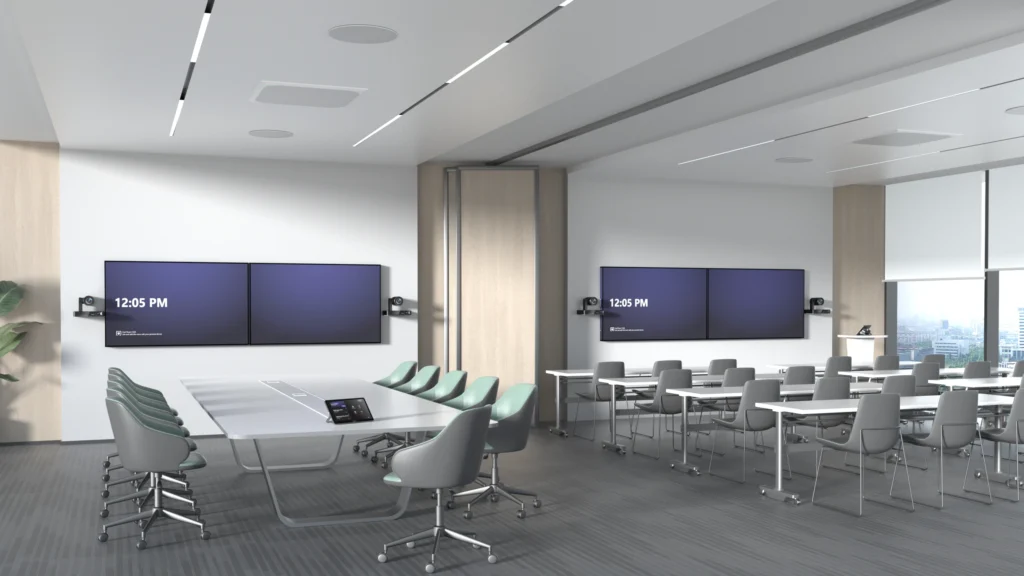
What Is a Divisible Meeting Room? A divisible meeting room is designed to operate as two or more independent meeting spaces, with the ability to open the partition and combine them into one larger room when additional capacity is needed. For example, a business might have two meeting rooms that each accommodate around 15 people. During a normal working day, both rooms can host separate meetings at the same time, each with its own display, camera, microphones, speakers and Microsoft Teams Rooms or Zoom Rooms system. When the partition is opened, the rooms can be combined into a larger space for 40–50 people. This creates a much more practical setting for: It gives businesses the flexibility of two everyday meeting rooms without losing the ability to bring larger groups together when required. How Does a Divisible Video Conferencing Room Work? The challenge is not simply opening and closing a movable wall. The video conferencing, audio and control systems must also respond correctly to each room configuration. When the partition is closed, each room should operate independently. Users should be able to start their own Microsoft Teams or Zoom meeting without affecting the room next door. Each space needs its own camera coverage, microphones, speakers, displays and meeting room controls. When the partition is opened, the technology can be programmed to switch into combined mode. The cameras, microphones, speakers and displays across both spaces then work together as one larger video conferencing system.From the user’s point of view, this should be straightforward. They select whether the rooms are being used separately or together or the system detects the partition position and the correct equipment becomes available. Two Independent Teams Rooms or Zoom Rooms In divided mode, each room can provide a complete and consistent meeting experience. Both rooms can have their own: This allows two groups to hold separate hybrid meetings at the same time, with no crossover between the audio, video or content being shared. Good acoustic separation is equally important. The partition and audio system must be designed to prevent conversations and sound from one room disrupting meetings in the other. One Larger Combined Meeting Space In combined mode, the rooms need to function as a single, joined-up environment. The system can use cameras positioned throughout the space to provide suitable coverage of presenters and attendees. Additional microphones and carefully positioned commercial audio ensure that people can be heard clearly, including those joining remotely. Content can also be shown across multiple displays so that everyone in the expanded room has a clear view. For larger training sessions or town halls, presenters may also use wireless microphones to address the room and take questions from the audience. The aim is to make the combined space feel like a purpose-built large meeting room, rather than two smaller rooms that have simply had the wall removed. Why are Businesses Investing in Divisible Meeting Rooms? Office space needs to support a wider range of activities than it once did. A business may need several smaller rooms for everyday meetings but still require a larger space for company-wide communication, training and collaboration. A divisible room provides both options within the same footprint. It can help a business: A combined space can also make larger hybrid meetings more inclusive by providing better camera coverage and clearer audio for remote attendees. The Technology Needs To Be Planned From The Start One of the most common mistakes is treating the AV system as an addition after the room layout and partition have already been agreed. A movable wall may divide the physical space, but the technology determines whether both room configurations are genuinely usable. Camera positions, microphone coverage, speaker zones, displays, cabling, acoustics and control systems all need to be considered during the design stage. The Microsoft Teams Rooms or Zoom Rooms setup must also be designed carefully so that users have a simple and consistent way to operate the system in both divided and combined modes. Planning the technology early allows it to be properly coordinated with the partition, furniture, lighting, network and room booking requirements. Creating a Genuinely Flexible Meeting Environment A well-designed divisible meeting room gives businesses the best of both worlds: two smaller rooms for everyday video conferencing and one larger space for training, town halls and staff meetings. The key is making sure the technology is as flexible as the room itself. Users should not need technical knowledge to change configurations or work out which microphones, cameras and displays to use. Rapid Technologies can design and install divisible Microsoft Teams Rooms and Zoom Rooms that operate independently or combine into a larger video conferencing space. If you are planning an office fit-out, refurbishment or meeting room upgrade, involve our AV team early to ensure the complete system works seamlessly in every room configuration.