
Transforming Synextra’s New Office into a Smarter, Connected Workplace
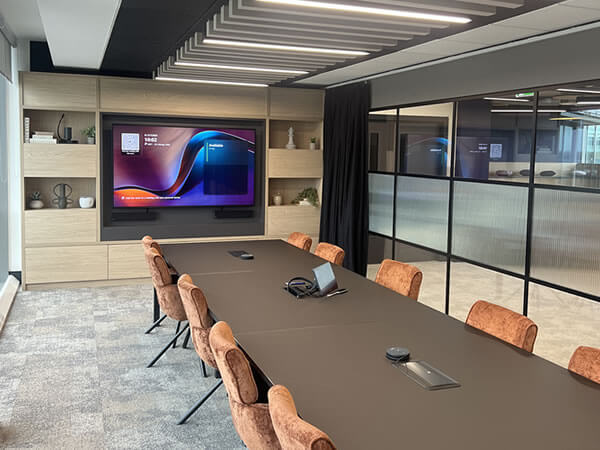
Scope of Work Synextra is a fast-growing IT support and cloud services provider based in Warrington, known for helping businesses modernise their technology and improve efficiency. When the company relocated to a brand-new office space, they wanted their workplace to reflect the same innovation and connectivity they deliver for their own clients. To achieve this, Synextra partnered with us to design and install a suite of audio-visual solutions that would enhance collaboration, simplify hybrid meetings and create a seamless experience for all users, from tech enthusiasts to those less familiar with AV systems. Meeting Rooms We equipped three meeting rooms with large-format Sony commercial displays and Yealink Microsoft Teams Room systems, creating an intuitive, plug-and-play experience for video calls and presentations. Each room was also fitted with Joan Room Booking Panels mounted on the glass panels outside, making it easy for staff to check availability, book meetings and manage room usage in real time. The combination of Yealink and Joan technology ensures meetings start smoothly and stay on schedule. Boardroom In the main boardroom, we installed a Yealink MVC S90 system to deliver exceptional video and audio quality for executive and client meetings. The system includes dual PTZ cameras for flexible framing, wireless microphones for clear sound and integrated speakers for even room coverage. A Joan Room Booking Panel was also installed outside the boardroom to provide instant visibility of bookings and availability. Collaboration Area To support informal discussions and team collaboration, we fitted the open-plan area with an iiyama interactive display, powered by Mago Pro software and paired with an iiyama UC Pro camera. This setup created a versatile space for spontaneous meetings, brainstorming sessions and content sharing, perfectly suited to a modern hybrid workplace. The Mago Pro collaboration platform enables users to wirelessly share content, annotate in real time and launch video meetings with ease, eliminating the need for cables or complicated setups. Its intuitive interface makes it simple for teams to present ideas, review documents and collaborate interactively, whether they’re in the room or joining remotely. The iiyama UC Pro camera ensures every meeting is delivered in crisp, high-definition quality, providing clear visuals and accurate framing for all participants. Together, these technologies give Synextra’s team a flexible, future-ready collaboration space that enhances communication and encourages creativity across departments. Here’s a few words from Synextra’s Executive Assistant, Chi Lee on their experience working with us: Did our team meet your expectations in terms of service and support? “Yes, they were great. Really handy and great communication.” The Synextra team found the installation process smooth and efficient, with strong communication from start to finish. How has the technology improved your operations? One sentence to describe your experience: “Efficient, knowledgeable, helpful and engaging.” Looking to upgrade your meeting spaces?Discover how we can help you create smarter, more connected environments with intuitive AV solutions. Speak to us today to book your very own consultation!
Why October 2025’s Teams Rooms Windows 10 Cut-off Matters More Than You Think
Meeting rooms are where it happens in hybrid work. But Microsoft is discontinuing support for Teams Rooms on Windows 10 on 14 October 2025 and it’s a bigger deal than it initially appears. Once support ends, the systems will not be provided with security patches and updates and will be exposed to attack. Technical support also will be discontinued and new features within Teams may no longer work on older systems. Not all Teams Room equipment can be upgraded to Windows 11. Solutions such as the Crestron Skull Canyon (C100, CX100) cannot be upgraded, but others, even recently released Poly or Logitech NUCs can have upgrade options available. If your meeting rooms have not been assessed in a couple of years, the time is now. Start with getting all your Teams Rooms devices audited, checking OS versions and identifying what can be upgraded and what has to be replaced. Start with high-traffic and client-facing spaces first and test the upgrades to ensure everything is okay, from control panels and booking systems to screens and cameras. This’s not about keeping up. It’s about maintaining trust, security and reliability across your collaboration spaces. Out-of-support systems introduce compliance issues, integration holdups and downtime, which no business can afford. Taking action now, you transform a required upgrade into an opportunity to upgrade your meeting rooms, enhance performance and future-proof your investment. Struggling to plan your Teams Rooms upgrade? Contact us today — we’ll guide you every step of the way.
Enhancing Hybrid Workspaces with Microsoft Teams Rooms Pro Digital Signage Integration
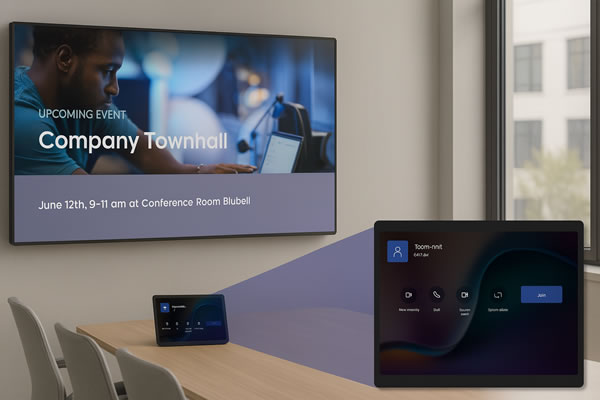
The shift to hybrid working has reshaped how teams collaborate, blending remote flexibility with face-to-face engagement. Microsoft Teams Rooms Pro is now pushing this evolution further by introducing digital signage, turning meeting rooms into constant communication hubs. What is Digital Signage in Teams Rooms Pro? Digital signage enables Teams Rooms devices to display dynamic content, such as company news, meeting schedules and live updates, even when the room isn’t occupied. This makes sure that important information is always visible, helping teams stay connected and informed throughout the day. Benefits for Organisations Adding digital signage to meeting spaces brings several clear advantages: Continuous Communication: Deliver timely messages without overloading inboxes, keeping everyone updated efficiently. Optimised Space Use: Display room availability and schedules to reduce downtime and maximise meeting room productivity. Improved Employee Engagement: Real-time, relevant content keeps staff informed and contributes to a stronger workplace culture. Implementation Essentials To fully benefit from digital signage, organisations need to ensure: Looking Ahead The launch of digital signage within Teams Rooms Pro highlights Microsoft’s commitment to supporting hybrid working environments. For AV integrators, it opens fresh opportunities to deliver comprehensive solutions beyond traditional conferencing setups. At Rapid, we’re eager to incorporate this innovation into our service offerings, helping clients build smarter, more connected workplaces. As hybrid work continues to evolve, adopting forward-thinking technologies like digital signage will be key to staying competitive and meeting client needs. Ready to future-proof your workspace with cutting-edge AV solutions? Contact Rapid today to discover how Microsoft Teams Rooms Pro digital signage can transform your meeting rooms and enhance collaboration across your organisation. Let’s create smarter, more connected environments together.
Windows 10 End of Life: What It Means for Microsoft Teams Rooms and AV Systems
Say Goodbye to Windows 10 – Time to Think Ahead Microsoft has announced that Windows 10 will reach End of Support on 14 October 2025. That means no more security updates, bug fixes, or technical support from Microsoft beyond this date. While this is important news for all IT departments, it’s particularly crucial for organisations using Microsoft Teams Rooms (MTRs) or other AV systems running on Windows 10. If your meeting rooms rely on Windows 10 compute modules, now is the time to take a closer look at your setup. Why It Matters for Your Teams Rooms Many Microsoft Teams Rooms in businesses and schools across the UK still operate using Windows 10. After October 2025, these systems will become increasingly vulnerable to security threats and may begin to lose compatibility with new Teams features and updates. For organisations that rely on seamless communication and hybrid collaboration, this could quickly turn into a real problem. Unpatched systems not only increase risk, but also create uncertainty for users. A room that worked perfectly yesterday may fail to deliver the same experience tomorrow – and when it’s a key client call or a hybrid team briefing, that’s not a risk worth taking. What’s the Impact on AV Systems? It’s not just about the core compute device. If your Microsoft Teams Room setup includes a Windows 10 PC, it could also affect connected components like displays, control panels, cameras and microphones. Compatibility issues may arise, performance could dip and the overall user experience could suffer. This is an ideal time to review your broader AV environment. Many businesses are using this change as an opportunity to upgrade their meeting room technology – future-proofing their workspaces while ensuring users continue to benefit from a reliable, high-quality experience. What Should You Be Doing Now? While the deadline might seem a while away, the reality is that planning a technology transition takes time. By starting now, you can explore your options without pressure, align changes with budgets, and avoid last-minute scrambles. We recommend reviewing: Even if you’re unsure where to begin, having a conversation with an experienced partner can help shape a clear, practical plan forward. How We Can Help As a UK-based audio-visual integrator, we work with organisations across sectors to design, upgrade and support Teams Room environments and integrated AV solutions. From reviewing your current setup to guiding you through Windows 11-compatible replacements, we provide expert advice and installation with minimal disruption to your day-to-day operations. Whether it’s a single meeting room or a full estate of hybrid workspaces, we’re here to make sure your systems continue to deliver performance, security and simplicity – long after Windows 10 is gone. Let’s Talk – No Pressure, Just Practical Advice The sooner you start planning, the more options you’ll have. We’re currently offering free consultations to help organisations like yours prepare for the Windows 10 End of Life and ensure your Microsoft Teams Rooms stay reliable, secure and future-ready. 📞 Book your free consultation now – Contact our AV experts